Как поменять цвет текста, отображаемого в качестве подсказки (hint), в элементе интерфейса?
Как правильно изменить цвет `hintTextAppearance` в `MyOutlinedBox`? В настоящее время я изменяю параметр `hintTextColor` в стиле `MyHintAppearance`, но это не приводит к изменению цвета. Я уже попробовал различные значения цвета, но ничего не работает. Вот мой текущий код:

```xml
<resources xmlns:android="http://schemas.android.com/apk/res/android">

    <style name="MyOutlinedBox" parent="Widget.Material3.TextInputLayout.OutlinedBox">
        <item name="boxStrokeColor">@color/my_blue</item>
        <item name="hintTextAppearance">@style/MyHintAppearance</item>
    </style>

    <style name="MyHintAppearance" parent="Widget.Material3.TextInputLayout.OutlinedBox">
        <item name="android:textSize">16sp</item>
        <item name="android:textColorHint">@color/my_blue</item>
        <item name="hintTextColor">@color/my_blue</item>
    </style>
</resources>
```

Буду благодарен, если кто-то сможет помочь мне с изменением цвета `hintTextAppearance`.
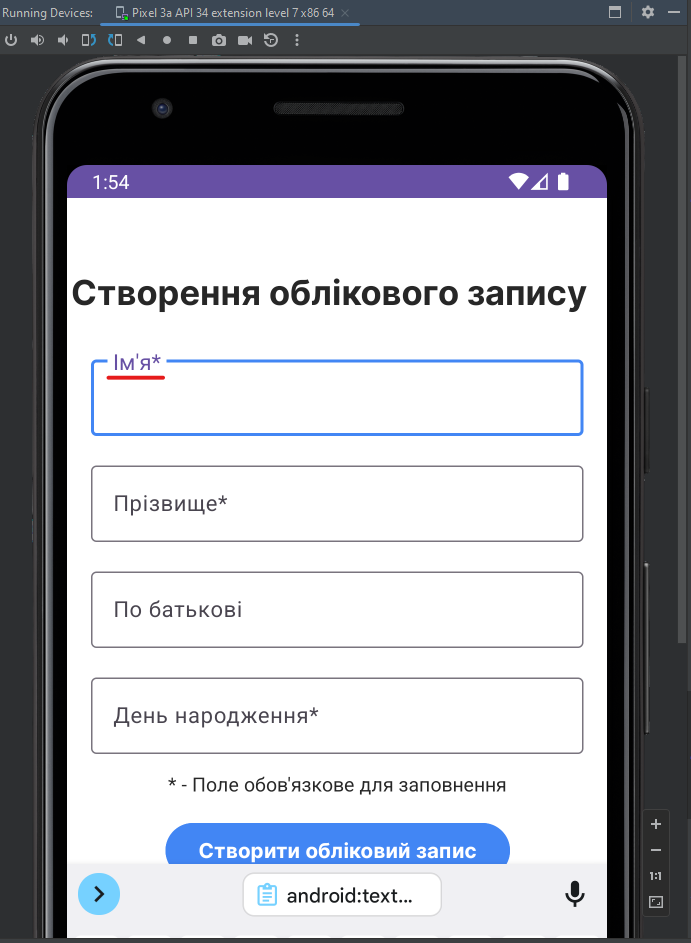
- 2 ноября 2023 г. 0:13
Для изменения цвета текста, отображаемого в качестве подсказки (hint) в элементе интерфейса, можно использовать атрибут `android:textColorHint` в стиле `MyHintAppearance`.

Однако в вашем коде вы также применяете стиль `Widget.Material3.TextInputLayout.OutlinedBox` в родительском стиле `MyHintAppearance`, который может перезаписывать установленный цвет.

Для правильного изменения цвета `hintTextAppearance` вам нужно указать атрибут `android:textColorHint` в родительском стиле `Widget.Material3.TextInputLayout.OutlinedBox`:

```xml
<style name="MyOutlinedBox" parent="Widget.Material3.TextInputLayout.OutlinedBox">
    <item name="boxStrokeColor">@color/my_blue</item>
    <item name="hintTextAppearance">@style/MyHintAppearance</item>
    <item name="android:textColorHint">@color/my_blue</item> <!-- Добавьте эту строку -->
</style>

<style name="MyHintAppearance" parent="Widget.Material3.TextInputLayout.OutlinedBox">
    <item name="android:textSize">16sp</item>
    <!-- Удалите строку <item name="android:textColorHint">@color/my_blue</item> -->
</style>
```

Теперь цвет текста подсказки должен измениться на указанный в `@color/my_blue`.
1. Добавьте новый цвет в файл values -> colors.xml:
<color name="m3_textfield_label_color_focused">#4286f4</color>

2. В вашем стиле, добавьте этот цвет как параметр hintTextColor:
<style name="MyOutlinedBox" parent="Widget.Material3.TextInputLayout.OutlinedBox">
     <item name="hintTextColor">@color/m3_textfield_label_color_focused</item>
</style>

3. Примените созданный стиль к TextInputLayout:
<com.google.android.material.textfield.TextInputLayout
     style="@style/MyOutlinedBox"
     android:id="@+id/textInputLayout2"
     android:layout_width="match_parent"
     android:layout_height="match_parent"
     android:layout_marginStart="1dp"
     android:layout_marginTop="100dp"
     android:layout_marginEnd="1dp"
     app:layout_constraintEnd_toEndOf="parent"
     app:layout_constraintStart_toStartOf="parent"
     app:layout_constraintTop_toBottomOf="@id/textInputLayout1"
     app:layout_constraintTop_toTopOf="parent">

     <com.google.android.material.textfield.TextInputEditText
         android:layout_width="match_parent"
         android:layout_height="wrap_content"
         android:hint="hint2" />

 </com.google.android.material.textfield.TextInputLayout>