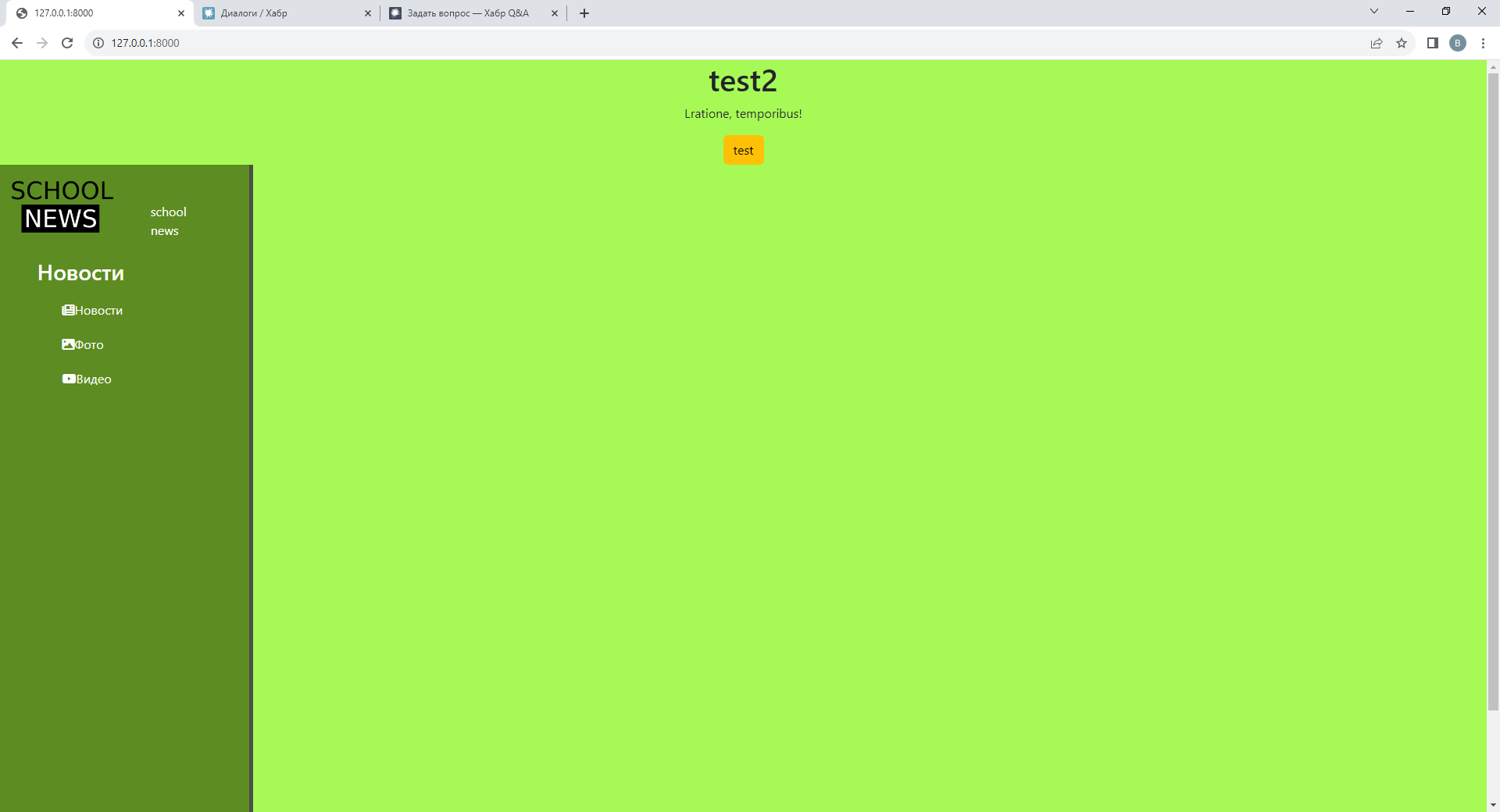
Как исправить сдвиг бокового меню при создании div?
Как исправить сдвиг бокового меню при создании div в index.html?

Вот пример кода index.html:

{% extends 'main/layout.html' %}

{% block content %}
    <div class="features" align="center" >
        <h1>test2</h1>
        <p>Lratione, temporibus!</p>
        <button class="btn btn-warning">test</button>
    </div>
{% endblock %}

А вот пример кода main.css:

body {
    background: #a6fa52fa;
}

aside {
    float: left;
    background: #5c8a21fa;
    width: 17%;
    padding: 2.5%;
    height: 100vh;
    color: #fff;
    border-right: 5px solid #4d4d4d;
}

aside img {
    width: 65%;
    float: left;
    position: relative;
    left: -40px;
    top: -30px;
}

aside ul {list-style: none}
aside ul li {
    color: #fff;
    display: block;
    margin-top: 20px;
    transition: all .6s ease;
}

aside ul li, aside ul a {text-decoration: none;}
aside ul li:hover, aside ul a:hover {
    color: #eb5959;
    text-decoration: none;
    transform: scale(1.05);
}
- 27 октября 2023 г. 18:38
Чтобы исправить сдвиг бокового меню при создании div, нужно изменить стили в main.css.

Вам нужно изменить значение paddinгов для aside элемента.
Пример:

```css
aside {
    float: left;
    background: #5c8a21fa;
    width: 17%;
    padding: 2%; /* изменяем значение padding на 2% */
    height: 100vh;
    color: #fff;
    border-right: 5px solid #4d4d4d;
}
```

После изменения этих стилей, боковое меню не должно сдвигаться при создании div.
Проблема с использованием float может быть решена с помощью flexbox или grid
body {
  display: flex;
  margin: 0;
}

aside {
  background: #5c8a21fa;
  width: 17%;
  padding: 2.5%;
  height: 100vh;
  color: #fff;
  border-right: 5px solid #4d4d4d;
}

aside img {
  width: 65%;
  align-self: center;
  margin-bottom: 20px;
}

aside ul {
  list-style: none;
  padding: 0;
}

aside ul li {
  color: #fff;
  margin-top: 20px;
  transition: all 0.6s ease;
}

aside ul li,
aside ul a {
  text-decoration: none;
}

aside ul li:hover,
aside ul a:hover {
  color: #eb5959;
  text-decoration: none;
  transform: scale(1.05);
}

.content {
  flex: 1;
  background: #a6fa52fa;
  padding: 2.5%;
}
 Когда используется float, необходимо добавить clear fix в body стилях.
body {
  background: #a6fa52fa;
}

aside {
  float: left;
  background: #5c8a21fa;
  width: 17%;
  padding: 2.5%;
  height: 100vh;
  color: #fff;
  border-right: 5px solid #4d4d4d;
}

aside::after {
  content: "";
  display: table;
  clear: both;
}

aside img {
  width: 65%;
  float: left;
  position: relative;
  left: -40px;
  top: -30px;
}

aside ul {
  list-style: none;
}

aside ul li {
  color: #fff;
  display: block;
  margin-top: 20px;
  transition: all .6s ease;
}

aside ul li,
aside ul a {
  text-decoration: none;
}

aside ul li:hover,
aside ul a:hover {
  color: #eb5959;
  text-decoration: none;
  transform: scale(1.05);
}